> For the complete documentation index, see [llms.txt](https://sdk-doc.tyrads.com/llms.txt). Markdown versions of documentation pages are available by appending `.md` to page URLs; this page is available as [Markdown](https://sdk-doc.tyrads.com/ios/initialization/premium-offers.md).
# Premium Offers
The **Premium Offers widget** is a standalone, high performance SwiftUI view that becomes available immediately after SDK initialization. It is designed to be highly flexible, allowing you to embed it anywhere in your application's view hierarchy.
**Key Features:**
* **More Offers**: Seamlessly opens the full Offerwall.
* **Active Offers**: Quick access to a user's currently active campaigns.
* **Campaign Details**: Direct navigation to specific campaign records.
* **Play**: Intelligent routing to activate the offer and redirect to the appropriate app store.
***
**1. Usage**
The widget is a standalone `View` — no manual navigation wiring required.
```swift
import TyradsSDKIOS
import SwiftUI
struct MyOffersView: View {
var body: some View {
ScrollView {
VStack {
// Standard integration, no parameters required
Tyrads.instance.topOffersWidget()
// ... your other views
}
}
}
}
```
***
**2. Customization Options**
You can control the visual presentation of the offers using the `widgetStyle` parameter.
| Parameter | Type | Default | Description |
| ------------- | -------------------------- | ------- | ------------------------------------ |
| `widgetStyle` | `TyradsPremiumWidgetStyle` | `.list` | Determines the layout of the offers. |
**Available Styles:**
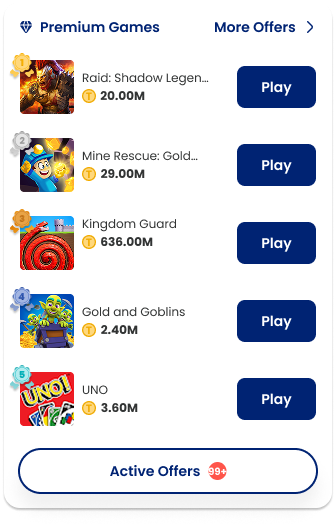
* `TyradsPremiumWidgetStyle.list`: Displays offers in a vertical list.
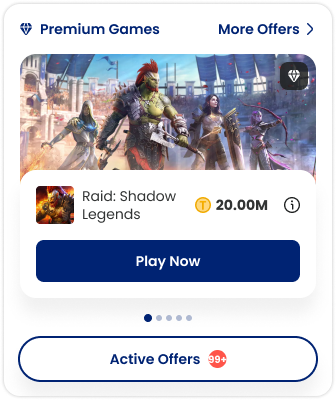
* `TyradsPremiumWidgetStyle.sliderCards`: Displays offers in a horizontal, swipeable card carousel.
Option 1 TyradsPremiumWidgetStyle.list
Option 2 TyradsPremiumWidgetStyle.sliderCards
**Example with Custom Style:**
```swift
Tyrads.instance.topOffersWidget(widgetStyle: .sliderCards)
.frame(minHeight: 160)
```
***
**3. Technical Requirements**
* **SDK Initialization**: Ensure `Tyrads.instance.initialize()` and `loginUser()` have been called before the widget is rendered.
* **Automatic sync**: The widget loads automatically after login and stays in sync with the SDK session — no manual reload needed.